Firmware Fundamentals – How to Install LuxOS: Step-by-Step Setup Guide
Installing firmware used to mean SD cards and SSH sessions, one machine at a time. With Commander, a LuxOS rollout is a network scan and a button.

This post is part of Luxor's Firmware Features Series, which covers the core Bitcoin mining concepts behind the flexible firmware features that give operators custom control over performance and profitability.
Installing firmware used to mean SD cards and SSH sessions, one machine at a time. With Commander, a LuxOS rollout is a network scan and a button.
TLDR
- LuxOS installs through Luxor Commander, no SD cards required for supported units.
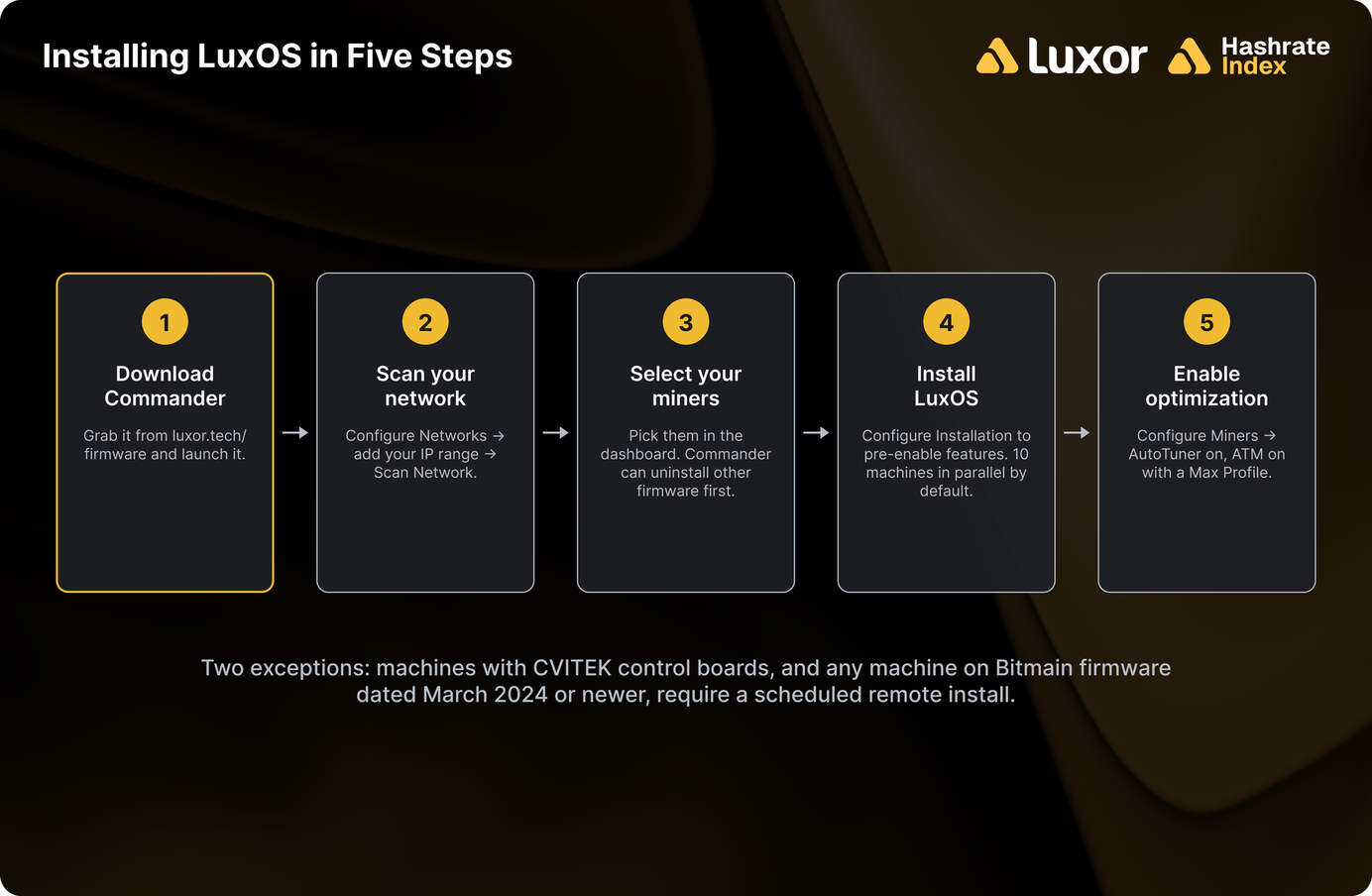
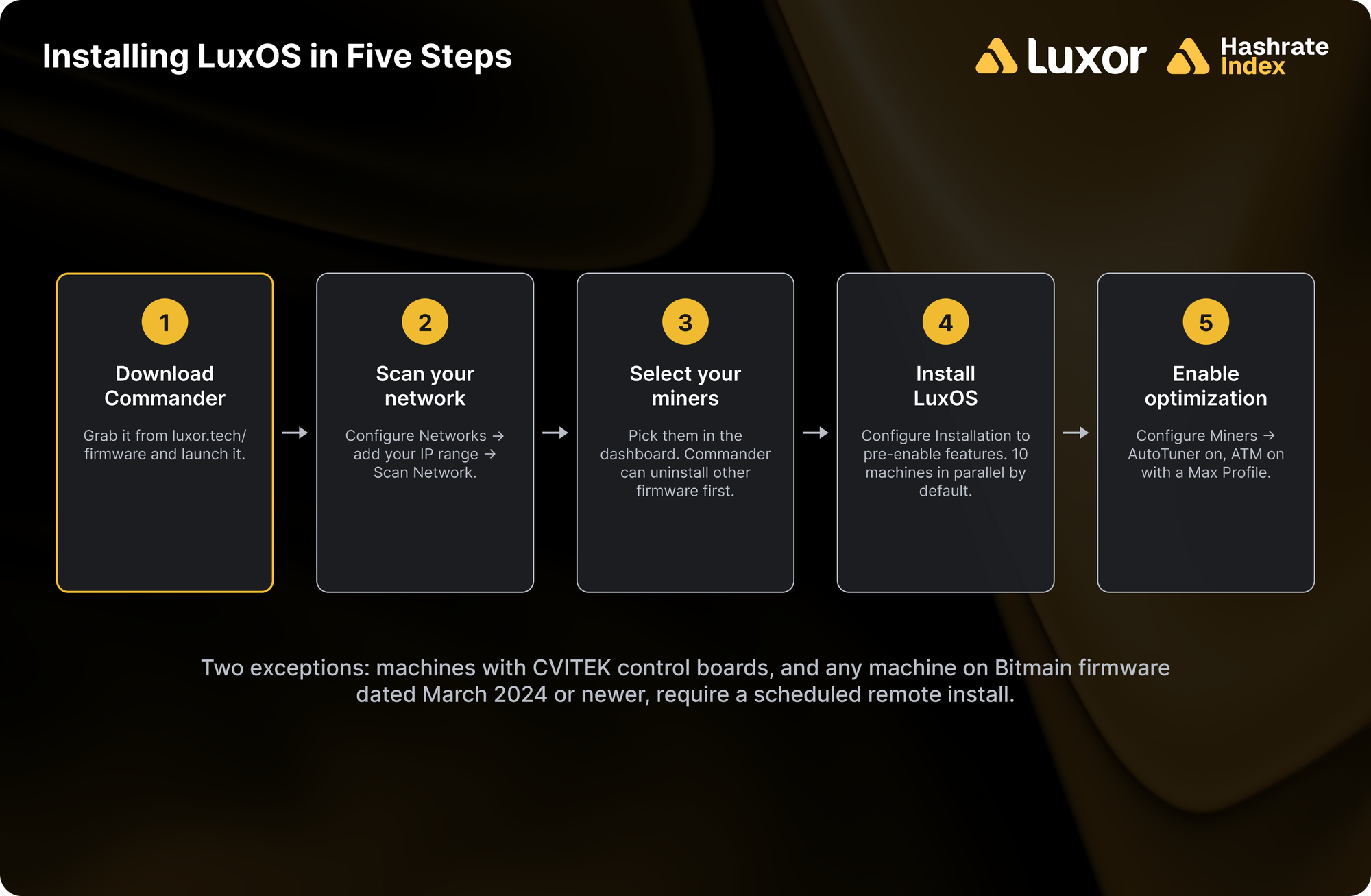
- The flow is five steps: download Commander, scan your network, select miners, install, then enable AutoTuner and ATM.
- Commander installs 10 machines in parallel by default (adjustable in settings) and can uninstall third-party firmware first.
- Two cases need a scheduled remote install: CVITEK control boards, and any machine on Bitmain firmware dated March 2024 or newer.
- Check the compatibility list first — support is specific to model and hashboard.
Before You Start
Two minutes of checking saves an afternoon. Confirm your exact model and hashboard number appear on the LuxOS compatibility list — support is granular, and two machines with the same model name can differ by control board. While you're there, note whether your units have CVITEK control boards, because those take the remote-install path described below rather than the self-serve one.
You'll also want your miners' IP range in hand, and network access to them from the machine running Commander. If you prefer to watch before you click, Luxor's one-minute deployment video covers the whole flow, and a two-minute optimization video covers the tuning that follows.
Step-by-Step: Installing LuxOS
1. Download and launch Commander
Get Commander from luxor.tech/firmware and open it. It's free, and it's the same tool you'll use afterwards for fleet-wide configuration, so it's worth getting familiar with.
2. Scan your network
Open Configure Networks in the top-right corner. Add your miners' IP range or individual addresses, press Add, select the range you want to scan, then Save changes and hit Scan Network. Your reachable miners populate the dashboard.
3. Select your miners
Pick the machines you want to install on. If they're currently running another third-party firmware, Commander can uninstall it from the same screen before proceeding — you don't need a separate tool or a manual rollback.
4. Install LuxOS
Click Install LuxOS. Before it runs, Configure Installation lets you pre-enable features like AutoTuner and Advanced Thermal Management so they're live the moment the firmware lands (both can also be set afterwards).
Installation takes a few minutes per batch. Commander flashes 10 machines in parallel by default; you can raise or lower that in settings (top right) depending on how much of your network you want saturated at once.
5. Enable optimization
This is the step that actually pays for the rollout, and it's the one people skip. Select your miners and press Configure Miners:
- Under Power, set Autotuner Mode to Enable, then Review and Apply. The AutoTuner will find the lowest power draw that holds your target frequency.
- Under ATM, switch on Advanced Thermal Management and choose a Max Profile — the ceiling ATM will push to when temperatures allow. Stick with the default hot-board temperature; it's there to protect your hardware. Leaving the minimum profile undefined lets a machine underclock as far as it needs to in order to stay safe instead of shutting down.
Luxor's ATM settings and recommended settings docs go deeper on the thresholds if you want to tune them deliberately rather than accept defaults.
When You Need a Remote Install
Two categories can't self-install: machines with CVITEK control boards, and any machine running Bitmain firmware dated March 2024 or newer. For those, contact Luxor to schedule a remote install — the team handles it over a VPN, and the remote install documentation covers the setup on your side.
This isn't a compatibility failure so much as an access one: the machines are supported, they just can't be flashed unattended over your LAN. Worth identifying which units fall into this bucket during planning rather than discovering it mid-rollout.
install FAQ
How long does installation take? A few minutes per machine, run in parallel batches — a default Commander session flashes 10 at a time, so most fleets are a short job rather than a long one.
Do I lose my pool settings? Configure pools as part of post-install setup; Commander applies pool and worker configuration fleet-wide from the same tool.
Can I go back to stock firmware? Yes — LuxOS includes an uninstall option, and Commander can manage firmware changes in bulk across a fleet.
My miner isn't detected in the scan, now what? Confirm the IP range is right and the machine is reachable from the Commander host, then check whether it's a CVITEK or new-Bitmain-firmware unit that needs the remote-install path.
Do I have to enable AutoTuner and ATM during install? No. Both can be configured at any time after the fact. But there's no reason to wait; the efficiency gain starts the moment tuning does.
Conclusion
A LuxOS rollout is a short job for most fleets, and the AutoTuner starts paying it back within the hour. The two things worth doing carefully are the compatibility check at the start and the optimization step at the end; the middle takes care of itself.
More From the Firmware Features Series
- What Is AutoTuner? LuxOS Autotuning Explained
- Bitcoin Mining Curtailment: How LuxOS Powers Down Fast
- Miner Thermal Management: Inside LuxOS ATM
- ASIC Overclocking & Underclocking: LuxOS Profiles
- Power Targeting: Watt-Level Fleet Control
Related Reading
- Introducing Commander: Luxor's Bitcoin Miner Management Software
- Unlock Efficiency with LuxOS Commander's Latest Features
- Maximizing Mining Efficiency on New Generation Hardware With LuxOS
- Go Further with Firmware
- Firmware Flexibility: Maximizing Mining Margins
- Top 5 Bitcoin Mining Firmware for 2026
Ready to roll it out? Download Commander, run the scan, and have your fleet tuned within the hour.
If you'd like to learn more about Luxor's full-stack Bitcoin mining services, reach out to [email protected] or visit luxor.tech.
About Luxor Technology Corporation
Luxor delivers hardware, software, and financial services that power the global compute and energy industry. Its product suite spans Bitcoin Mining Pools, ASIC Firmware, Hardware trading, Hashrate Derivatives, Energy services, a Miner Management software, Commander, and a bitcoin mining data platform, Hashrate Index.
Disclaimer
This content is for informational purposes only, you should not construe any such information or other material as legal, investment, financial, or other advice.

Hashrate Index Newsletter
Join the newsletter to receive the latest updates in your inbox.